Read the code
Accessibility tree, landmarks, names, live regions
Criteria covered (5)
1.3.2Reading order2.4.1Skip repeated blocks2.5.3Visible label matches name4.1.3Status messages announced1.4.11Control contrast
Case study · Accessibility at scale · Enterprise AI · Design leadership
AI products now change every sprint, but accessibility is still checked by hand, a few screens at a time. For any company selling AI to enterprises and governments, that gap is a risk to revenue, a legal risk and a risk to its reputation. On Infosys Topaz AI Next, with 7 AI capabilities and 385 screens, two-thirds of the accessibility checks had never been run. I designed and led a system that makes accessibility testing as fast and repeatable as the product itself.

AI Next had automated accessibility scans on all 385 screens, but no reliable picture of how accessible it really was. 64.8% of 20,690 checks had never been evaluated.
I built a three-layer audit system: machines scan, Claude tests the live product in a real browser, and a human makes the judgment calls. All 55 criteria are covered, and every verdict comes with evidence.
A platform-wide baseline across 7 AI capabilities. A full audit of the product's front door, with 54 of 55 criteria settled. And 13 failures traced to 10 design-system fixes.
The method covers about 98% of criteria per screen, up from about 36%. It needs an estimated 80–88% less human effort than testing by hand, with the full platform planned for 12 weeks (see the effort model).
Outcome of Phase 1: a complete, defensible accessibility picture of AI Next, and a plan leadership can act on.
01 — The challenge
Enterprise buyers increasingly expect accessible AI products, and every AI Next capability had a Lighthouse score. Our dashboard marked all seven audits “complete.”
But automated scanning can settle only about 20 of the 55 WCAG 2.2 A and AA criteria on a screen. It can find low-contrast text and unnamed buttons. It can't tell whether a keyboard user gets trapped, whether focus is visible, or whether an error message explains how to fix the problem. On a platform full of AI workflows, those are exactly the moments that decide whether someone can finish a task.
The question wasn't “what's our score?” It was “can a person using a keyboard, a screen reader or a magnifier actually use our AI products, and can we prove it?” That changed the job from running a scan to designing an audit system.
02 — Strategy
I gave every one of the 55 criteria an owner, matched to whoever is best at testing it.
Lighthouse runs across every screen of all 7 capabilities and settles about 20 criteria per screen, such as contrast, names, labels and language.
385screens scannedClaude works in a real browser. It presses Tab, zooms, resizes, injects CSS, measures colors and reads the accessibility tree, covering 34 criteria that scans can't.
34criteria per screenI decide borderline cases, anything with side effects, and final sign-off. Flash-rate safety (2.3.1) goes to specialist tooling and is never guessed.
1.2%of rows needed meAccessibility tree, landmarks, names, live regions
1.3.2 Reading order2.4.1 Skip repeated blocks2.5.3 Visible label matches name4.1.3 Status messages announced1.4.11 Control contrastTraps, focus, hover content, dragging, cancelling a tap
2.1.1 Works by keyboard2.1.2 No keyboard traps2.4.7 Visible focus2.4.11 Focus not hidden3.2.1 No surprises on focus3.2.2 No surprises on input2.5.1 No complex gestures required2.5.2 Taps can be cancelled2.5.7 Alternative to dragging1.4.13 Reachable hover content320px reflow, zoom, orientation, text spacing
1.3.4 Any orientation1.4.4 Text resizes to 200%1.4.10 Reflows at 320px1.4.12 Survives text spacingTimeouts and content that moves on its own
2.2.1 Adjustable time limits2.2.2 Pause moving contentHeadings, instructions, images of text, ways to find pages
1.3.3 Not relying on shape or position1.4.5 Real text, not images of text2.4.6 Descriptive headings and labels2.5.4 No motion-only controls2.4.5 More than one way to find pagesErrors, suggestions, sign-in, and consistency across screens
3.3.1 Errors identified3.3.3 Fix suggestions3.3.4 Error prevention for key transactions3.3.7 No re-entering information3.3.8 Sign-in without puzzles3.2.3 Consistent navigation3.2.4 Consistent naming3.2.6 Consistent helpShould we buy an audit, or build a capability?
Options
Chose
A repeatable three-layer system
Why
AI products change every sprint, and a one-off audit is out of date by the next release. A system can re-test after each fix and keep accessibility verified over time.
03 — Platform baseline
Layer 1 ran across the whole platform. For the first time we could see all seven capabilities side by side, and see how much the scanner simply couldn't tell us.
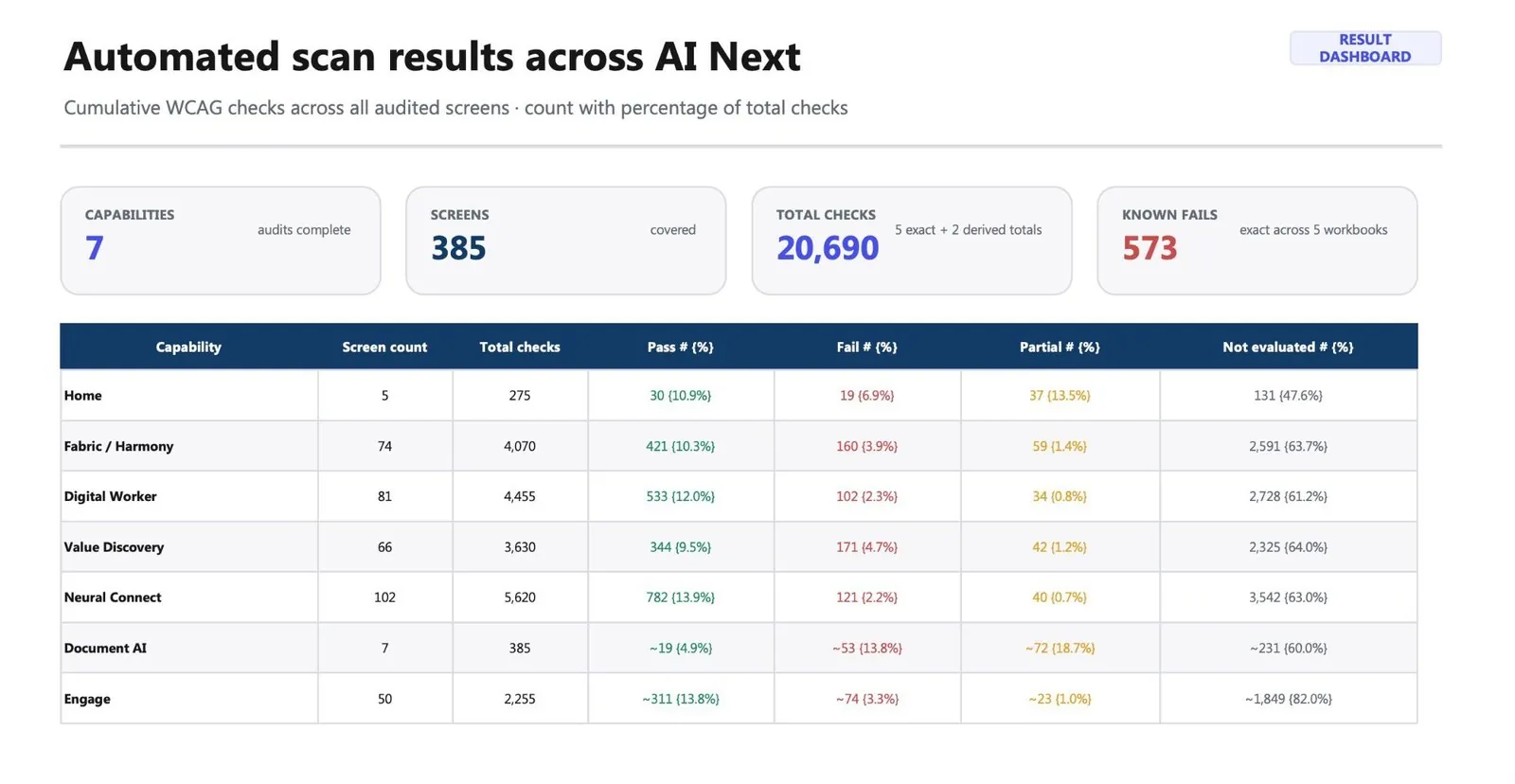
| Capability | Screens | Pass | Fail | Partial | Not evaluated |
|---|---|---|---|---|---|
| Home | 5 | 30 | 19 | 37 | 131 (47.6%) |
| Fabric / Harmony | 74 | 421 | 160 | 59 | 2,591 (63.7%) |
| Digital Worker | 81 | 533 | 102 | 34 | 2,728 (61.2%) |
| Value Discovery | 66 | 344 | 171 | 42 | 2,325 (64.0%) |
| Neural Connect | 102 | 782 | 121 | 40 | 3,542 (63.0%) |
| Document AI* | 7 | 19 | 53 | 72 | 231 (60.0%) |
| Engage* | 50 | 311 | 74 | 23 | 1,849 (82.0%) |
| Total | 385 | 2,440 | 700 | 307 | 13,397 (64.8%) |
* Document AI and Engage figures are derived estimates. 573 of the 700 failures are exact counts from five capability workbooks.
The same automated failures kept coming back across screens: missing main landmarks, low-contrast text, buttons with no name, fields with no label. That pattern told me early that the fixes would belong in the design system, not on individual screens.
04 — Calibration
Before pointing Layer 2 at our product, I calibrated it against a public benchmark site. Claude ran all 55 criteria on 6 screens, for 330 checks in total, and graded how confident it was in every row.
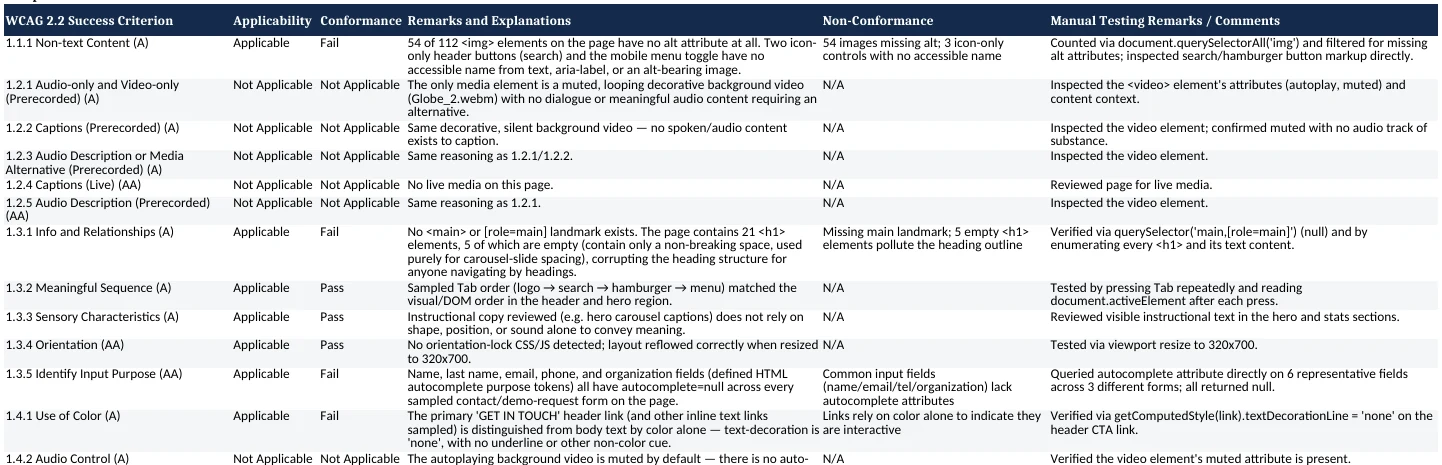
The turning point came when Claude reversed its own call. It had marked a link as meeting the 24px target size without measuring it. On a second check it measured the link at 82.4 × 18.5px and changed its answer to Fail. A re-run days later gave identical results. That's when I knew the method was safe to scale.
How do you get leadership to trust an AI audit?
Options
Chose
Make every claim checkable
Why
Every row records the exact query, value or key press behind it, and judgment calls cite the W3C documentation. Trust you can verify scales. Trust you have to assume doesn't.
05 — Full audit
The AI Next landing page is the first screen every buyer and user sees. I audited it with all three layers together, for a full A and AA picture.

<div> elements, with no button role, no name and no keyboard access (Works by keyboard, 2.1.1 · Name, role and value exposed, 4.1.2)<div> elements that can't be focused (Works by keyboard, 2.1.1 · Name, role and value exposed, 4.1.2)text-decoration: none (Not color alone, 1.4.1)Read straight from the plugin's live configuration. There's no pause control anywhere on the page.
{ autoplay:true, autoplayTimeout:5000, loop:true }I tabbed to four elements in a row, and none showed an outline, shadow or border.
outline:none · box-shadow:none
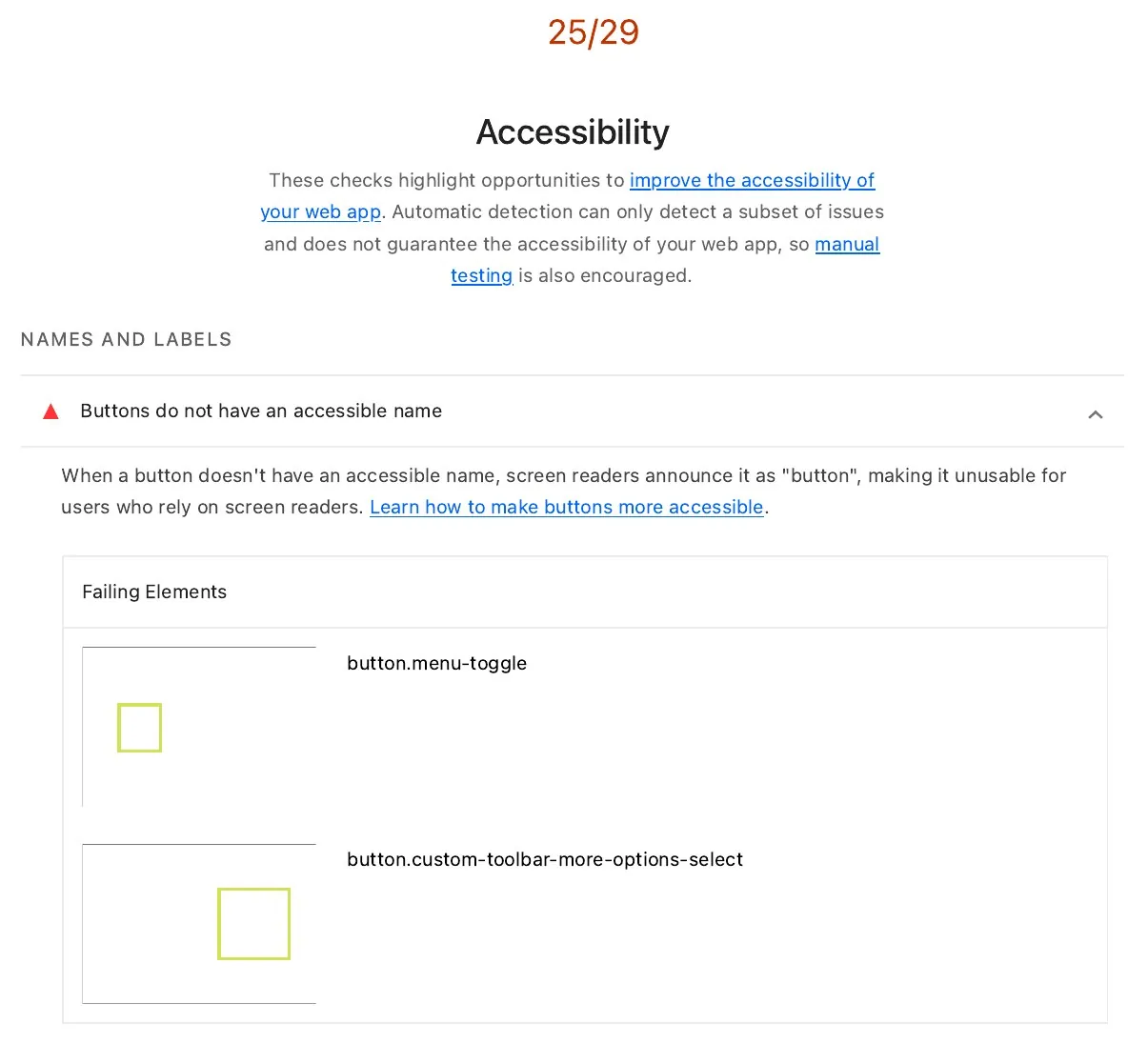
54 of 112 images have no alt text, and the search buttons and menu toggle have no accessible name.
<button><i class="fa-search"></i></button> // name: ""More than 39 fields have no label and no autocomplete. Five of the page's 21 H1s are empty.
<input placeholder="E-mail"> // no label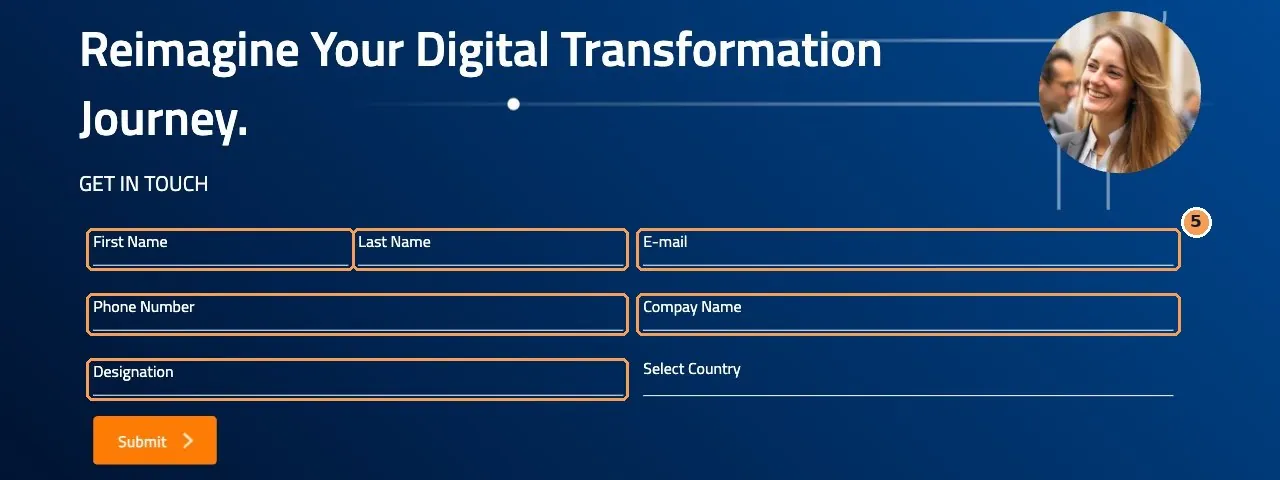
<label> and no autocomplete (Labels and instructions, 3.3.2 · Autofill for personal fields, 1.3.5)To test error handling, someone had to submit a live lead form. When Claude tried, the platform's safety layer stopped it, so I submitted the form myself with clearly labeled test values. Claude then inspected what came back:
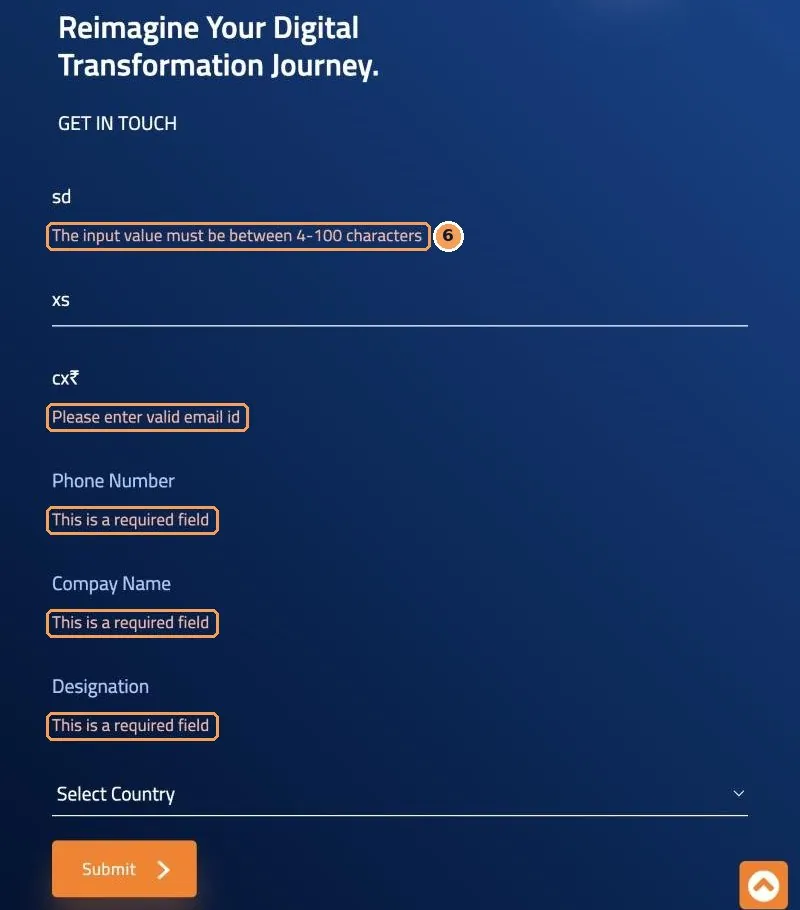
What assistive technology receives
Partial · Errors identified (3.3.1) The errors are specific, but assistive tech can't see them. Pass · Fix suggestions (3.3.3) The messages suggest how to fix the input. Fail · Status messages announced (4.1.3) No live region exists anywhere on the page.
06 — Before → After
| Dimension | Before | After |
|---|---|---|
| Coverage | About 20 of 55 criteria settled per screen | 54 of 55, using all three layers |
| Evidence | A score and a “Not Evaluated” label | The exact query, value or key press behind every row |
| Human effort | 225–290 hours of testing by hand | 34–46 hours of review (modeled) |
| Unknowns | Hidden behind “complete” | Named, each with a reason |
| Output | A list of failing screens | 10 component fixes that reach every screen |
07 — Design system
I traced every failure back to the component or token that caused it. Ten fixes close all 16 open findings on the front door. Because they live in shared components, they'll reach every screen that uses them.
| System fix | Change | Who it unblocks | Resolves |
|---|---|---|---|
| Focus ring token | A 3px :focus-visible outline on every control | Keyboard users |
|
| Link style | Links underlined by default | People with color blindness or low vision |
|
| Text field | A required label, errors linked to their field and flagged as invalid, and autocomplete | Screen reader users, people with cognitive disabilities |
|
| Status region | A shared role="status" region for results | Screen reader users |
|
| Carousel | Real, labeled buttons, a pause control, and no autoplay | Keyboard users, people with attention or motion sensitivity |
|
| Icon button | aria-label required, or the build fails | Screen reader users |
|
| Image | Alt text required, or the image explicitly marked decorative | Screen reader users |
|
| Page template | A skip link, one <main>, one H1, and a lint rule against empty headings | Keyboard and screen reader users |
|
| Border token | Control borders at 3:1 contrast or better | People with low vision |
|
| Target token | A 24×24px minimum hit area | People with motor impairments |
|
What counts as “done”?
Options
Chose
The fix is measured again
Why
After each fix ships, Claude re-runs the exact check that failed. A row only flips to Pass when it can be measured, so the workbook never claims more than it can show.
08 — Leadership and alignment
An AI-run audit inside an enterprise needs a yes from people who are measuring very different risks. I designed the program around each one.
| Stakeholder | What they needed | What I delivered |
|---|---|---|
| My manager | Is it accurate, and what will it cost? | A leadership deck, a pilot-first plan, and human hours spelled out month by month |
| IT security | An AI extension inside our network | A scoped security exception: one asset, one intranet host, no credential handling |
| Accessibility reviewers | Can we check this? | Their existing workbook format, with evidence and a confidence grade on every row |
| Engineering | What exactly do we change? | Fixes at the component and token level, each with a check they can repeat |
| Marketing | No junk leads in our system | No automated form submissions, and one labeled test that I sent myself |
| People with disabilities | Can I complete my task? | Every fix mapped to the people it unblocks |
09 — Rollout
Phase 2 brings all three layers to every screen. It starts with the smaller capabilities, runs a five-screen calibration pilot in each, and has a review checkpoint after every wave.
Scroll sideways to see all 12 weeks.
10 — Business impact
From about 20 of 55 criteria settled to 54 of 55, shown on the front-door audit.
Measured · see effort model, row G34–46 hours of review instead of 225–290 hours of testing by hand.
Modeled · see effort model, rows A–CIf the same 3–4 hours a week went into testing by hand, it would take 56–73 weeks.
Modeled · see effort model, rows E–FEach fix lands in a shared component, so it improves every screen that uses it.
Basis: failures traced to shared templatesBecause every verdict is reproducible, the results can feed an Accessibility Conformance Report (VPAT) for enterprise procurement.
Basis: evidence recorded on every rowAccessibility rules in procurement and regulation build on WCAG. 13,397 unknowns became a measured backlog with an owner.
Basis: platform baselineCoverage is measured. The effort and timeline figures come from a planning model, not from timed results. Every input is shown below so you can check the arithmetic, or swap in your own assumptions.
| Row | Figure | How it's calculated | Status |
|---|---|---|---|
| A | 225–290 h manual baseline | 385 screens × 35–45 min each for a trained tester to run the 34 manual criteria | Assumption |
| B | 34–46 h human review | Total of six activities: setup 1–2 h · calibration review 3–5 h · borderline calls 10–14 h (about 58 screens × 10–15 min) · 7 capability checkpoints × 1–1.5 h = 7–10 h · QA spot-check of 19 screens × 15 min = 4–5 h · weekly syncs 9–10 h | Estimate |
| C | 80–88% less human effort | 1 − B ÷ A, calculated at both ends: 1 − 46/225 = 80%, and 1 − 34/290 = 88% | Derived |
| D | 260–340 h Claude time | Row A's per-screen time (225–290 h), plus cross-screen passes (7 × 3–4 h = 21–28 h), plus roll-ups (16–24 h) | Estimate |
| E | 12 weeks rollout | Row D spread across 12 weeks is about 22–28 h a week of Claude testing. The pace is set by the weekly human review, not by Claude. | Plan |
| F | 56–73 weeks by hand | Row A ÷ 4 h a week. This compares the two approaches with the same human time budget. | Derived |
| G | 36% → 98% coverage | Lighthouse settles 20 of 55 criteria per screen, from the workbooks. The three-layer audit settled 54 of 55 on the landing page. | Measured |
Why trust a model that isn't measured yet?
Conservative where it matters
Row B assumes about 15% of screens need a judgment call. The calibration run measured 1.2% of rows, so real review time is more likely to come in below the estimate than above it.
Biggest sensitivity
Row A's minutes per screen drive both the baseline and Claude's time. If testing by hand takes 25 minutes a screen instead of 35–45, the saving drops to about 70–80%. It's still large.
How it gets replaced
The Phase 2 pilot logs start and end times for every screen, plus every minute I spend reviewing. After the pilot, rows A–F are recalculated from real measurements.
11 — Conclusion
Before this work, accessibility at AI Next was a dashboard score with a 65% blind spot. Now it runs as a program. Every criterion has an owner layer, every verdict has evidence, every failure has a design-system fix, and the platform rollout has a schedule, a cost and a definition of done.
Phase 1 proved the hard part: an AI agent can do rigorous, checkable accessibility testing on a live enterprise product while a designer keeps the judgment. Phase 2 is now an execution problem, not a research problem.
Accessibility didn't need more testers. It needed a better-designed system for testing, and someone to own the judgment.
12 — How I work
The ask was to fill gaps in a spreadsheet. I made it about whether people can use our AI products, and whether we can prove it.Evidence: three-layer strategy, chapter 02
I traced 13 failures back to 10 shared fixes, so the impact reaches every capability.Evidence: remediation plan, chapter 07
I set guardrails before the first test, named the unknowns, and treated the AI's refusal to submit a live form as the system working.Evidence: guardrails and the human-in-the-loop test, chapters 02 and 05
Security, engineering, marketing and leadership each had a reason to say no. I designed the plan so each could say yes.Evidence: stakeholder plan, chapter 08
Coverage, effort, timelines and procurement readiness, all quantified and labeled honestly.Evidence: business impact, chapter 10
Claude does the hands-on testing, which comes to hundreds of hours across the full rollout. I own the method, the trust model and every judgment call.Evidence: calibration, chapter 04
Known limits, by design: screen-reader exposure is checked through Chrome's computed accessibility tree rather than NVDA, JAWS or VoiceOver. Flash-rate safety goes to specialist tooling. Both are listed in the plan, not left out of it.
Glossary